
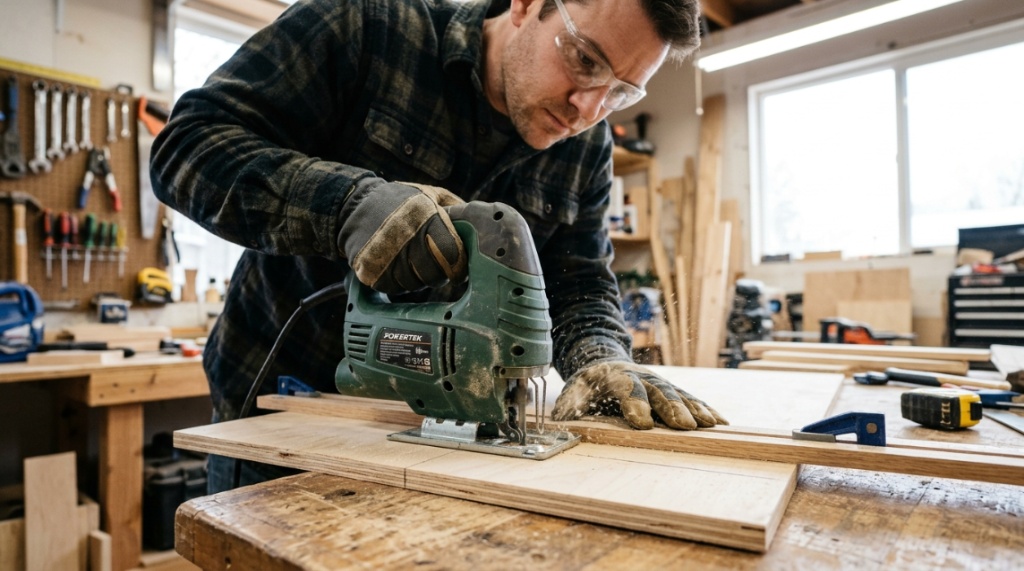
You just bought an affordable jigsaw to save money, but your cuts look like they were made by a drunk beaver. The blade wanders, the wood splinters, and the finish is rough. You’re not alone—this is the #1 frustration for DIYers using budget tools. Here’s the truth: getting smooth cuts with a cheap jigsaw isn’t about spending more. It’s about technique, blade selection, and setup. In this guide, I’ll show you exactly how to transform a budget tool into a precision cutting machine, using the same methods professional carpenters use on expensive models.
What Causes Rough Cuts on a Budget Jigsaw?
Rough cuts happen for three main reasons: vibration, blade deflection, and tear-out. A cheap jigsaw vibrates more than premium models, but the biggest culprit is usually the blade and how you guide the tool. Let’s break down each cause so you know what to fix first.
The Vibration Problem: Why Budget Saws Shake
Inexpensive jigsaws lack advanced counterbalance systems. This creates orbital vibration that transfers to the workpiece. To combat this, use two hands—one on the handle and one on the sole plate. Also, let the saw do the work; pressing down hard increases friction and vibration.
Blade Deflection: The Hidden Enemy
Thin blades bend during the cut, especially when turning or using aggressive feed rates. Solution? Use a thicker blade (bi-metal) and shorten the stroke length. For curves, use a narrower blade but reduce feed pressure to let the blade catch up.
Tear-out on the Top Surface
The blade exits the top of the wood, splintering the veneer. Simple fix: apply painter’s tape over the cut line. This stabilizes the grain and reduces chip-out by 80% on cheap saws.
Which Blade Type Gives the Smoothest Finish?
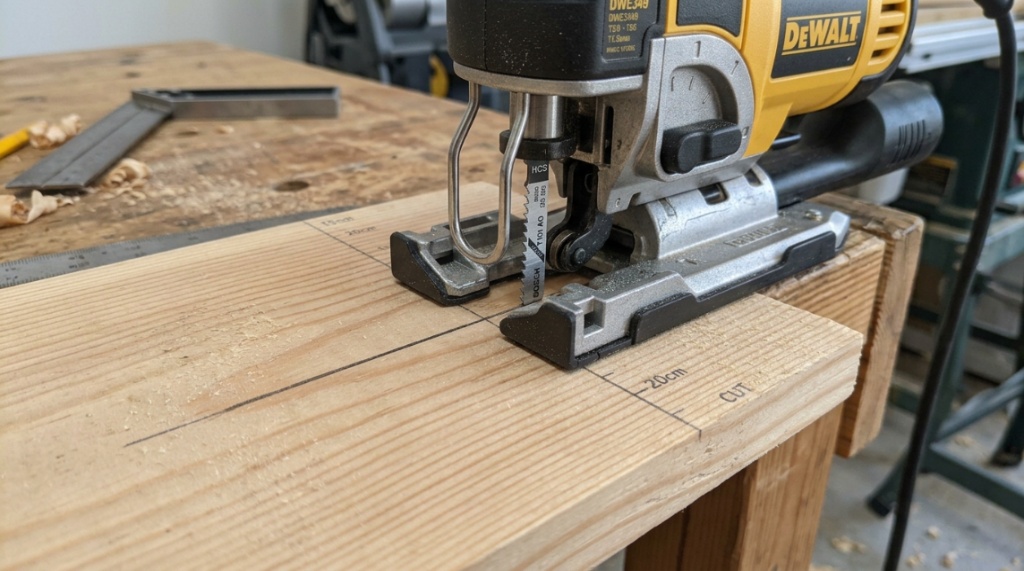
T-shank blades with 10–12 TPI (teeth per inch) and a ground, flush-cut design produce the smoothest results. Skip the cheap blades that come with your saw—they’re made for demolition, not finish work. Invest in a quality blade like Bosch T101B or Diablo’s precision set.
How TPI Affects Cut Quality
More teeth per inch mean smaller chips and a finer finish. For plywood and laminates, use 10–12 TPI. For solid wood, 8–10 TPI works better. For metal, 14–20 TPI. Match the TPI to the material thickness—thin material needs more teeth to avoid grabbing.
Bi-Metal vs. HSS Blades
Bi-metal blades (made from two metals) flex without breaking and stay sharper longer. HSS (High-Speed Steel) blades are cheaper but dull fast, causing burning and rough edges. On a cheap saw, bi-metal compensates for vibration by cutting cleaner with less effort.
Anti-Stick Coating: Worth It?
Yes. A PTFE coating on the blade reduces friction and heat. This prevents resin build-up, which drags the blade, causing rough cuts. Spend an extra dollar on coated blades for smoother results.
How to Set Up a Cheap Jigsaw for Perfect Cuts
Before cutting, spend 5 minutes adjusting your saw. Most budget models have adjustable sole plates and speed dials. Set them correctly, and you’ll reduce blade wander and tear-out instantly. Here’s a quick step-by-step setup guide.
Step 1: Adjust the Sole Plate Angle
Loosen the bevel clamp (usually a lever or Allen screw) and set the sole plate to 90° using a square. If it’s off by even 2°, your cut will be angled. Tighten securely—a loose plate moves mid-cut.
Step 2: Set the Rolling Foot (If Equipped)
The rolling foot prevents splintering by pressing down on the wood just ahead of the blade. Lower it until it just touches the surface. If your saw lacks this, use a zero-clearance insert or tape.
Step 3: Choose the Right Orbital Setting
Orbital action (the blade moving in a slight ellipse) cuts faster but rougher. For smooth cuts, set the orbital to “0” or “1” on the dial. On cheaper saws, “0” is safest for clean edges on plywood and acrylic.
Step 4: Speed Control
Use variable speed at 3–4 out of 6 for wood. High speed creates heat and burn marks, while low speed causes chattering. For laminates, use low speed with a fine blade to avoid melting the resin.
Why Your Feed Rate Matters More Than the Saw
Feeding the saw too fast or too slow is the #1 cause of rough cuts on budget tools. The ideal feed rate lets the blade cut continuously without forcing, producing fine sawdust instead of chips.
Signs You’re Pushing Too Hard
Burn marks, blade deflection, and a wandering cut line mean you’re forcing it. Slow down. Listen to the motor—it should hum, not strain. If you see chips flying, you’re pushing too hard.
Signs of a Poor Feed Rate
If the saw jumps or vibrates excessively, you’re going too slow, causing the blade to rub instead of cut. Increase pressure slightly until you feel a steady pull.
Technique: The “Pull” Method
Instead of locking the saw in a death grip, use a light pinch with your index finger on the front. Pull the saw along the line—don’t push. This keeps the blade aligned and reduces deflection.
Can You Cut Curves Smoothly with a Cheap Jigsaw?
Yes, but you need to slow down and use a narrow blade (like a T119B for wood or T118B for metal). The secret is never to force the turn—make relief cuts first for tight radii.
Making Relief Cuts for Sharp Curves
For circles or tight curves, drill a small hole inside the waste area and cut to the line, stopping before the curve. Then make several perpendicular cuts from the waste side to the line, creating “fingers.” This relieves material stress, allowing the blade to turn smoothly.
Pivot Turns vs. Continuous Motion
For a 90° corner, stop the saw with the blade at the corner, then pivot the sole plate while the blade is still running. This creates a sharp corner without rounding. Practice on scrap wood first.
Using a Guide Fence for Straight Lines
Cheap jigsaws often don’t include a rip guide. Make a simple one from a straight board and clamps. Set it 5mm from your cut line and run the sole plate against it. This yields perfectly straight, smooth cuts every time.
Is a New Saw the Only Way to Get Clean Cuts?
No. A $30 saw with the right technique can outperform a $200 saw with poor technique. But there are upgrades—like a zero-clearance insert or a better blade—that close the gap faster.
Cheap Upgrades That Improve Cut Quality
- Zero-clearance insert: Replaces the wide throat plate and supports the wood around the blade, preventing tear-out.
- Electrician’s tape: When placed under the sole plate, it reduces friction and scratches on laminate surfaces.
- Anti-splinter guard: A thin plastic piece that fits over the blade to press the veneer down.
When to Consider Upgrading Your Saw
If your saw has excessive blade play (side-to-side movement when you move the blade by hand), you won’t get consistent smooth cuts regardless of technique. Check the blade holder for wear. If it wiggles more than 1mm, it’s time to replace the saw.
For a budget-friendly upgrade that doesn’t break the bank, check out these smooth cuts cheap jig saw options that balance affordability with precision features.
How to Avoid Splintering on Plywood and Laminates
Splintering on plywood occurs because the top veneer is unsupported. The best solution is to cut from the “good” side down, so the splintering happens on the hidden side. This simple trick instantly improves visible cut quality.
The “Good Side Down” Rule
When using a jigsaw, the blade enters from the sole plate side (flat) and exits on the opposite side (top). So, place the side you want to see in contact with the sole plate. This means marking your cut line on the underside and flipping the board.
Painter’s Tape Method
If you can’t cut from the back, apply a layer of 2-inch painter’s tape directly over the cut line. Draw your line on the tape. The tape supports the veneer and reduces chipping. Works brilliantly on melamine and MDF.
Using a Scoring Pass
First, run the saw along the line with the blade set shallow (2mm depth) to score the top layer. Then, restart the cut at full depth. This prevents the blade from catching and tearing the surface.
What’s the Best Way to Cut Metal Without Replacing the Saw?
Use the correct blade and slow down. Cutting metal requires a bi-metal blade with 14 TPI or higher. Set the orbital action to “0” and use cutting fluid or beeswax to lubricate the blade.
Choosing the Right Blade for Metal
Look for blades labeled “metal cutting” that are made from bi-metal. Standard HSS blades will dull instantly, ruining your workpiece. A blade specifically for aluminum (like T118AH) makes jagged edges smooth.
Speed and Feed Recommendations
Cut metal at speed “1” or “2” (low RPM). Use steady, even pressure—never force it. Let the blade do the work. For thick steel (>3mm), drill 8mm holes along the cut line to make the job easier.
Preventing Blade Breakage
Uneven pressure causes blade twisting and breaking. Keep the sole plate flat against the metal and always use clamps. Never cut unsupported thin sheet metal—it will vibrate and chatter.
When working with budget-friendly power tools, maintaining consistent blade speed is crucial to avoiding jagged edges. Power stability heavily relies on modern battery engineering—to understand how energy delivery impacts tool performance during long cuts, check out our guide on how lithium-ion batteries power modern cordless tools.
Can You Use a Cheap Jigsaw for Precision Woodworking?
Absolutely, if you focus on the blade and your work holding. Precision woodworking requires stable support, a sharp blade, and planning the cut path. It’s not the saw’s price that limits you, but the operator’s patience.
Building a Simple Workbench Stand
A cheap jigsaw can cut through thin materials cleanly if the wood doesn’t vibrate. Clamp the workpiece to a sturdy workbench or use a saw table with a zero-clearance throat. This prevents sagging and chattering.
Techniques for Dovetails and Joinery
While a jigsaw isn’t ideal for dovetails, you can use it to cut the waste between pins. Use a fine blade and cut on the waste side of the line. Then, clean up with a chisel. This is faster than sawing by hand and yields accurate results.
Acceptable Tolerance Levels
With the setup above, you can achieve cuts within 1/32″ accuracy, which is more than sufficient for most carpentry and furniture projects. That’s just slightly less precise than a $1000 table saw.
How to Maintain Your Cheap Jigsaw for Consistent Smooth Cuts
Regular maintenance prevents the gradual degradation of cut quality. Dust, old grease, and blade debris cause the saw to work harder and cut rougher. Here’s a quick maintenance checklist.
Cleaning the Sole Plate and Throat Plate
Use a nylon brush or compressed air to remove sawdust from the sole plate and the throat plate (where the blade goes). A gritty surface scratches the workpiece. Replace the throat plate if it’s worn.
Lubricating the Gears
Open the gear housing and apply lithium grease to the cam gear every six months. This reduces vibration and noise, making the saw run smoother.
Adjusting the Blade Guide Roller
Most jigsaws have a small roller behind the blade. Over time, it wears out. Worn rollers allow the blade to wander. Check it monthly and replace if you see flat spots.
What Other Tools Help Improve Jigsaw Cut Quality?
Your jigsaw doesn’t work in a vacuum. The right accessories can elevate a $40 saw to professional performance. A circular saw guide track, a clamp, and a good work light make a huge difference.
Using a Guide Track for Straight Cuts
Instead of a straight board, invest in a track saw guide (or make one from a 1×2″ aluminum square). The jigsaw’s sole plate slides against it, producing glass-smooth edges on sheet goods.
The Role of Clamps
Never cut while holding the workpiece down with your free hand. Use F-clamps or a workbench. Vibrating wood makes the cut jagged and unsafe. Clamping stabilizes both the work and the saw.
Lighting and Lines
A headlamp or work light helps you see the cut line exactly. Also, mark your line with a thin pencil (0.5mm) or a marking knife. The thinner the line, the easier it is to follow smoothly.
Common Mistakes People Make with Cheap Jigsaws
Even with good technique, certain habits ruin cut quality. Knowing these mistakes will help you avoid them proactively.
Mistake #1: Forcing the Saw
Pushing the saw faster than the blade can cut causes the blade to deflect and overheat. This leads to rough, wavy cuts. Always let the blade bite.
Mistake #2: Ignoring the Sole Plate
If the sole plate is loose or has planks of wood stuck to it, your cut will wobble. Keep it clean and tight. Also, always use the flat side of the sole plate against the wood.
Mistake #3: Using a Dull Blade
Dull blades burn the wood and create a jagged edge. Replace your blade every 2-3 hours of active cutting. It’s a cheap investment for better results.
Frequently Asked Questions
What is the best TPI for smooth cuts on plywood?
For smooth cuts on plywood, use a blade with 10–12 TPI. More teeth produce smaller chips, reducing tear-out and leaving a cleaner edge.
Why does my jigsaw keep burning the wood?
Burning happens when you push too slowly or use a dull blade. Increase feed rate slightly and replace the blade. Also, lower the speed setting for hardwoods.
Can you cut a straight line with a jigsaw?
Yes, with a guide fence or track clamp. Without a guide, it’s very difficult. Always use a straight edge to ensure a smooth and straight cut.
Is orbital action bad for smooth cuts?
Orbital action at high levels (3-4) makes cuts rougher. For smooth cuts, set it to 0 or 1. This reduces speed but greatly improves the finish.
Do cordless jigsaws cut as smoothly as corded ones?
Yes, if they have variable speed and a decent blade. The main difference is runtime and weight, not cut quality. A good brushless motor helps maintain speed under load.
What causes the blade to bend and wiggle?
Blade bending comes from excessive feed pressure, thin blades, or a loose guide roller. Replace the blade with a thicker one and reduce pressure.
Can I use a jigsaw to cut aluminum?
Yes, use a bi-metal blade with 14 TPI, set the saw to low speed, and apply cutting fluid. Clamp the aluminum tightly to prevent vibration.
Conclusion: Master the Tool, Not the Price Tag
Smooth cuts with a cheap jigsaw are absolutely achievable—they just require you to swap out the factory blade, adjust your technique, and control the environment. Start by fixing the blade and the feed rate, then add a zero-clearance insert and a guide. These changes cost under $20 and will transform your tool’s performance.
Now, grab your saw, apply these tips, and make a test cut on scrap plywood. You’ll feel the difference immediately. And when you’re ready to upgrade your cheap saw to a slightly better budget model, we’ve reviewed the best options that deliver professional results without the high price. Your next project deserves clean, smooth edges—and now you know exactly how to get them.